
How to Snag a Treasury: Part II in this series covers the how-to of creating a Treasury list.
For some, the process of creating a Treasury might seem a bit daunting. We’ve seen several comments on how challenging it can be to get an open spot, but we’ve also seen several tips from team members and the Storque on not only “snagging” a Treasury but how to make it eye-catching, memorable and most importantly “HOT”! We decided to compile all of this helpful information here, to shed some light on this whole process, thereby making it easier for you to know the joy of getting your 1st Treasury.
In our experience it’s probably best to create a title and a draft list before your Treasury spot becomes available. Once you type the title in the live Treasury, it can not be changed so think carefully!
Your Treasury will be created with either items from your favorites or a search you’ve done on Etsy that matches whatever theme you’ve chosen for your list, such as picks from your Street Team(s), specific color (s) or based on a mood, favorite saying, utility of the items or even the materials (recycled, natural etc.). For example, I recently posted a list with items drawn from a search under Handmade items, tags, title and descriptions for “NCTriangle and blue”. You can record the item numbers from your search in a word document until a Treasury spot becomes available.
The Poster Sketch. For those who like a sneak peek at how their finished list will appear, Etsy developed this excellent tool which allows you to design a “draft” Treasury before you layout your actual one. It’s great because you have as much time as you like to get the exact theme, color combinations and positions for your items without any pressure. To fill in your test list, click edit next to a box and enter an item number. Click ok to enter that item into the box. You can drag boxes around to swap out their positions. Once you acquire a Treasury spot, you simply copy and paste your item numbers in the item id box of the live Treasury and you’re done!
How do you actually get a treasury?
Step 1: Enter the Treasury.
Step 2: Look in the upper left portion of your screen. Find the number of lists that are currently in the Treasury.
 IF THAT NUMBER IS LESS THAN 333:
Step 3: Scroll to the bottom of the page. You will see a box at the bottom where you may type in the title for your Treasury List.  Once you click Create to acquire a Treasury spot, a blank treasury will appear.
Once you click Create to acquire a Treasury spot, a blank treasury will appear. 
Now you can simply copy and paste your item numbers from the Poster Sketch or your Word document in the item id box of the live Treasury! There are twelve main boxes, with four alternates to the right. Be sure to select items for all boxes, so that your treasury has a better chance of appearing on Etsy's front page.
 A cool feature is the ability to edit your list whenever you like--you can move items around by clicking and dragging to the new location and adding new items too.
IF THAT NUMBER IS MORE THAN 333:
 The Treasury is full and will not allow you to create a new list. You must wait for enough lists to expire so the number falls below 333.
 How will you know when there will be less than 333 treasuries?
Step 1: Sort the lists by "expiration" (click on the "expiration" tab).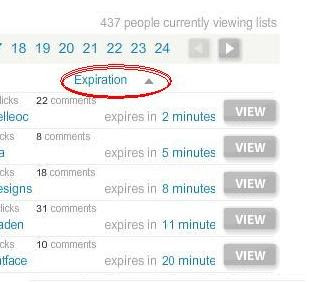
Step 2: Count from the first page with the lists that will expire first and count by pages, there are 20 treasuries on a page, to find out when the 333rd list will expire.
We also recommend returning to the list with at least 30 minutes left because people delete treasuries and sometimes it reaches 333 faster.
**To avoid losing an available spot, DO NOT REFRESH THE PAGE AS YOU ARE WAITING FOR IT TO OPEN" The page will refresh itself.
Step 3: As soon as you see the box appear at the bottom of your screen, click inside so that you see your cursor blinking. You should have a list. Now, type in your title.
**It’s best if you come up with a title beforehand to save time and avoid embarassing typos!

A few things to remember about the Treasury:
- You get to have one active list at a time (one regular treasury and one Treasury West, if you choose)
- Lists expire anywhere from one to three days
- There is a maximum of 333* total active lists allowed at one time (that number is 222 for "test" sever treasury, Treasury West).
- Your list can be edited as many times as you like
- All added items must be actively listed for sale, not already sold
- The Treasury is not intended for self-promotion.
- If you’d like to convo sellers that are in the Treasury without spamming, avoid sending mass convos with the same subject line! Remember, you can always post the link to your list on our forum to notify sellers. I know I always enjoy the surprise of finding out on my own that I’ve been featured!
- You get to have one active list at a time (one regular treasury and one Treasury West, if you choose)
- Lists expire anywhere from one to three days
- There is a maximum of 333* total active lists allowed at one time (that number is 222 for "test" sever treasury, Treasury West).
- Your list can be edited as many times as you like
- All added items must be actively listed for sale, not already sold
- The Treasury is not intended for self-promotion.
- If you’d like to convo sellers that are in the Treasury without spamming, avoid sending mass convos with the same subject line! Remember, you can always post the link to your list on our forum to notify sellers. I know I always enjoy the surprise of finding out on my own that I’ve been featured!
- You can customize your List by editing the title, subtitle and location (linkable).

What do all the stars mean?
Blue stars: This indicates that you are the curator of the list

Blue stars: This indicates that you are the curator of the list
Gold stars: This indicates that one of your items is included in a list (item is visible to the public)


Silver stars: This indicates that one of your items is an alternate in a list (item is visible only to the curator)
For answers to FAQ about treasury lists, see the Storque!
Check out the last part in our series, “Having Fun Choosing the Right Kind of Treasury” coming soon.


 Etsy Admin often choose an exceptional Treasury list to promote on the
